wait the way you edited this is actually insane 🔥 how long did it take??
1.9M81,00032,400
Most relevant
GenComment
wait the way you edited this is actually insane 🔥 how long did it take??
3dLikeReply24.3K😆
Y
youAuthor
haha thank you!! maybe 2 hours 😅
3dLikeReply
N
noah_t
saving this immediately
2dLikeReply512
Write a comment…
😊GIF
For parody, memes and creative use. Don’t impersonate real people or fake endorsements. Terms
Examples · tap to use
Use the Facebook comment generator to build a fictional conversation with names, verified badges, reactions and replies. Preview a comment or full post, then export a clean PNG. Write your own text or request AI suggestions.
Reactions
Read the reaction palette in the Facebook comment generator
The Facebook comment generator displays reactions beside each comment. A Like suggests approval; Haha or Angry changes the tone. Match the symbols to the fictional conversation you are illustrating.
Like
The default. Plain agreement, and the only one most comments ever get.
D
Daniel Rowe
Great write-up, shared it with the team.
3hLikeReply12
Love
Warmer than a like. Turns up on personal news, milestones and anything a community feels ownership of.
M
Marisa Contreras
Ten years today. Thank you all for sticking with us ❤️
5hLikeReply486
😆
Haha
The comment landed as a joke. Stacked with Like it reads as affectionate; alone it can read as mockery.
T
Tom Whitaker
My printer has done this exact thing since 2011
1dLikeReply231😆
😮
Wow
Surprise at a number, a before-and-after or an announcement nobody expected.
P
Priya Nair
Wait, you did all of that in one weekend?
8hLikeReply64😮
😢
Sad
Sympathy. Common under closure notices, memorials and bad news — a context where a fake screenshot does real harm.
E
Ellen Brooks
So sorry to hear this. The shop meant a lot to this street.
2dLikeReply158😢
😡
Angry
Directed at the subject of the post, rarely at the commenter. The rarest badge, and the one that changes a screenshot's meaning most.
G
Greg Sanders
Third price rise this year with no explanation.
6hLikeReply342😡😢
In the post
Build a post with the Facebook comment generator
Follow the Facebook comment generator from the first line to the final PNG. These screenshots show the editor controls you will use.
01
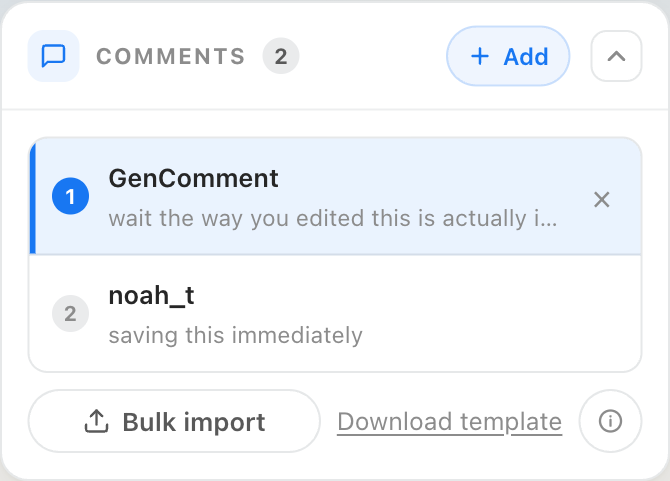
Add or import your comments
In the Facebook comment generator, hit + Add to drop in a comment, or Bulk import a whole thread from the downloadable template — a single reply or a full Facebook comment section.
02
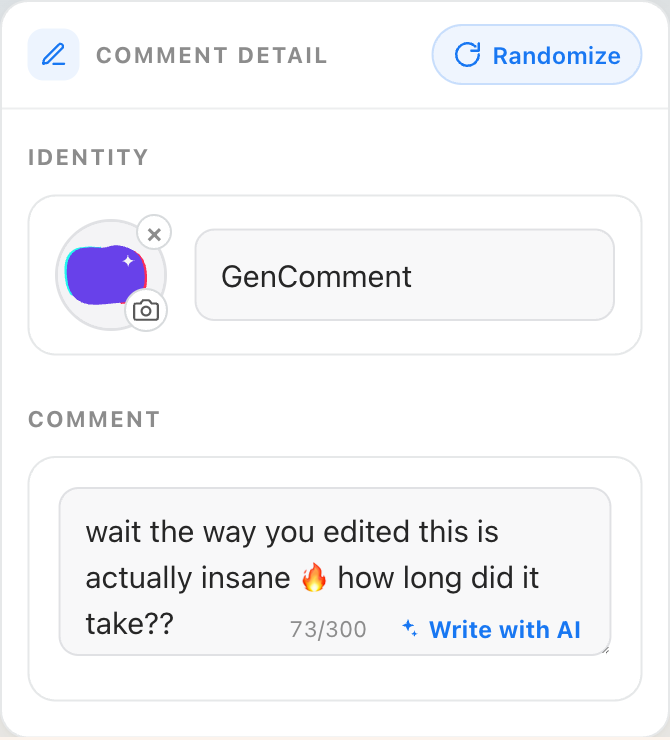
Name the commenter and write the line
Give each speaker a fictional name in the Facebook comment generator, then write a line — or tap Write with AI for something that reads like a genuine Facebook comment.
03
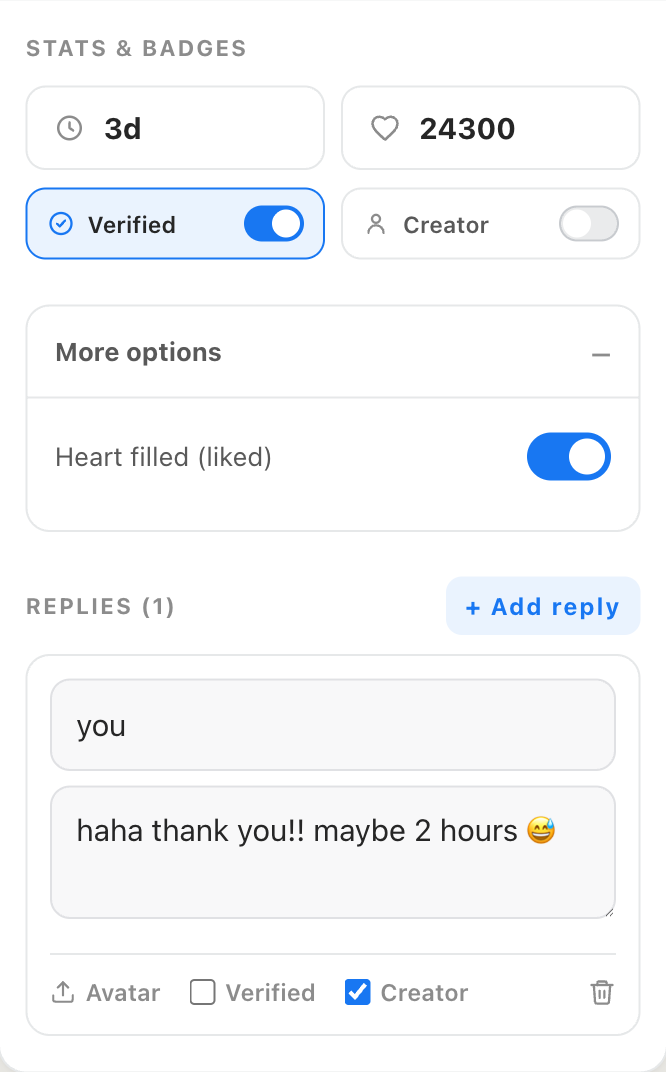
Tune reactions, the blue seal and replies
In the Facebook comment generator, set the timestamp and reaction count, flip on the blue verified seal, and add a reply with the Author chip — the small details that make a screenshot believable.
04
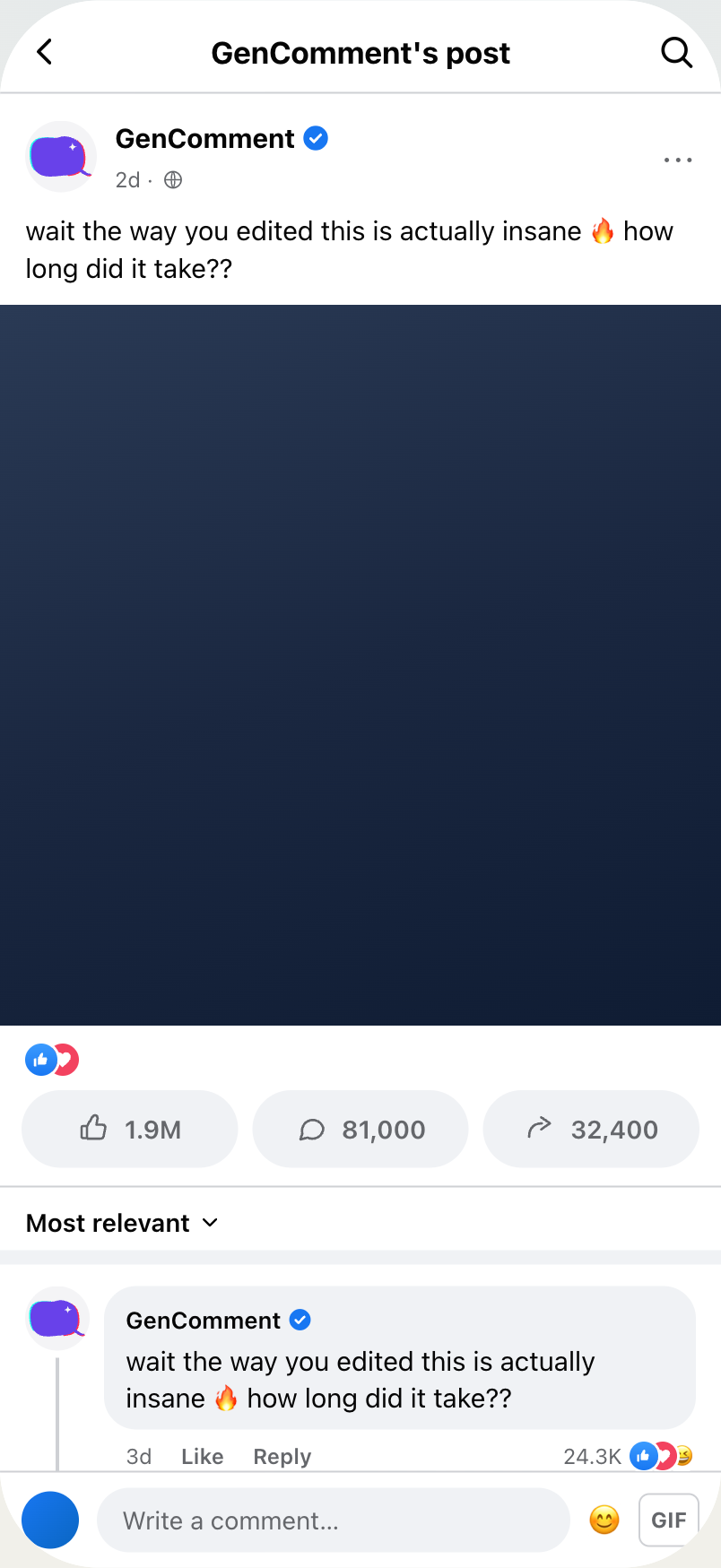
Preview the post and export the comment image
Preview the Facebook comment generator output as a post, switch between light and dark, then hit Download PNG — a clean, watermark-free image ready for a Reel or deck.
Threads
Facebook comment generator examples with branching replies
These Facebook comment generator examples show light and dark themes, distinct speakers and nested replies. Each card uses the actual renderer.
N
Nina Torres
obsessed with this, repurchasing immediately 😭
2dLikeReply31K😮
K
Kai Mendez
the way this changed my whole morning routine 🔥
6hLikeReply19.8K
T
Tech DailyAuthor
so glad it helped!! tell a friend 🥹
5hLikeReply870
E
Emma Doyle
ok the production quality alone deserves an award
1dLikeReply11.4K😆
L
Luca Romano
where is this?? asking for a road trip 🗺️
9hLikeReply7.5K
Z
Zara Ahmed
I never comment but this one earned it
4dLikeReply5.9K
O
Oliver Grant
POV: you just found your new favorite page 📸
2dLikeReply8.8K😆
Built for Pages
Where a Facebook comment generator helps creators
Use a Facebook comment generator for fictional video scenes, community response drafts and clearly labeled client mockups.
J
Jordan Avery
please do a part 2 on this 🙏
3hLikeReply12.4K
T
Tech DailyAuthor
part 2 dropping tomorrow 👇
2hLikeReply640
Creators
Reels & video hooks
Overlay a believable Facebook comment on your Reel or video — the “replying to a comment” format that keeps people watching past the first second.
L
Local Eats Club
added this to the group pins, everyone needs to see it 📌
1dLikeReply3.2K😆
Pages & groups
Group & Page screenshots
Mock up the exact comment a Page or group member would leave, complete with reactions and an Author reply, for community posts and recaps.
D
Daniel Reyes
third order this month, the quality is unreal
3dLikeReply980
Marketing
Reviews & social proof
Drop true-to-life praise comments into ad creatives and client decks — believable social proof without screenshotting real, private profiles.
F
Flora Wong
this layout is going straight into my design system
6hLikeReply410
Design
UI placeholders
Fill product mockups, tutorials and slides with authentic-looking Facebook comments instead of obvious lorem-ipsum placeholders.
T
Tech Daily
wait the way you explained this finally made it click, what camera did you shoot it on?
2dLikeReply18.6K😆
M
Maya Lin
right?? been subscribed for years and this is the best one 💯
1dLikeReply940
Real names
Name your characters in the Facebook comment generator
The Facebook comment generator supplies the visual details. Invent distinct names, align timestamps and keep each reply relevant to the scene. Review these choices before exporting:
1Use a real-sounding full nameFacebook is real-name first — “Sarah Klein” or a Page name reads true; an @handle or “user123” instantly does not.
2Match reactions to the comment's ageA two-hour-old comment has a handful of reactions, not 90k. Skip round numbers, and only stack love/haha when the line earns it.
3Keep timestamps consistentRecent replies read 2h or 4h, older threads 2d or 1w — line the time up with the post you're faking.
4Spend the blue seal and Author chip sparinglyOnly verify an account that plausibly would be, and reserve the Author chip for the Page's own reply. Overuse is the tell.
5Write the line short and conversationalFacebook comments are a little longer than TikTok's but still casual — a full sentence, an emoji, the way people actually type.
6Let replies sound off-the-cuffAuthor replies are fast and friendly — “so glad it helped!!” beats a polished paragraph every time.
What thin tools skip
Choose a Facebook comment generator for editable conversations
A Facebook comment generator keeps the conversation editable alongside its appearance. Choose a comment image for a video overlay or a full post when the surrounding context matters.
Template / post mockupFacebook comment generator
Reaction clusterPlain like countLike / love / haha badges stacked like the app
Blue verified sealMissing or off-brandFacebook’s exact blue check
Reply threadsSingle comment onlyNested replies, each with its own avatar
Author labelNot supportedBlue “Author” chip on the Page’s own reply
Light & darkOne themeMatch any post, switch instantly
ExportWhole faked post, watermarkedJust the comment — or a full post — clean PNG @2x/@3x
Pages and people
Plan both sides with the Facebook comment generator
A Facebook comment generator turns a name and a line of text into an image that looks just like a real comment from the app — no screenshotting a live section or exposing real profiles. Export it as a clean PNG that drops straight into a Reel, video or slide. On other platforms? The TikTok comment generator and Instagram comment generator do the same.
Short-video creators reach for a fake Facebook comment most often — the “replying to a comment” format is a strong hook that depends on a comment reading as genuine. Give it a believable reaction count, stack the like, love and haha badges, and toggle the blue verified seal. And since a Facebook comment runs longer and more conversational than a TikTok reply, the wording matters as much as the badges.
Replies, reactions and full comment threads
Real Facebook conversations happen in reply threads, so you can add replies under any comment — each with its own name, avatar and reactions (like, love, haha, wow, sad, angry) — plus the blue Authorchip on the Page's reply. Stack several comments into one image for a whole comment section, or switch to Post view for a complete Facebook post.
Write it yourself, or let AI help
Coming up with a believable Facebook line is half the battle, so the writer is built in. Type your own, or describe the post and let it suggest realistic lines — praise, a question, a hot take — to drop in and tweak. The AI helps you find something to say; it never takes over the editable comment image. Need more AI suggestions from the Facebook comment generator? See Pro plans.
Free, private and safe for Pages
The Facebook comment generator renders manual edits and PNG exports in your browser. AI requests send the supplied prompt to a generation service, and signed-in library syncing stores your work with your account. Use fictional identities and label mockups clearly. Save your Facebook comment generator design in My files to revisit it, or sign in there to keep work across devices.
Asked a lot
Facebook comment generator questions before you export
How should I plan a Facebook comment generator scene?
Use the Facebook comment generator with fictional names, plausible counts and consistent timestamps. Keep replies conversational and reserve the Author chip for the page character. The purpose is a readable mockup, not evidence of a real interaction.
Can I render comments inside a full post?
Yes. The Facebook comment generator offers a Post view with a header, caption, cover image and activity counts. Use Comments for a transparent card, or Thread for replies inside a phone frame. Check the crop before exporting longer conversations.
Is this Facebook comment generator free?
Manual editing and PNG exports in the Facebook comment generator are free, with no account or watermark required. AI writing has a usage allowance; Pro and credit packs provide more generations when you need them.
Can I add a badge and profile picture?
The Facebook comment generator lets you toggle the verified badge and upload a photo you own or have permission to use. An initials avatar also works for fictional characters. A badge in a mockup does not verify a real account.
Can I build replies with separate identities?
Yes. Add replies in the Facebook comment generator and give each speaker a name, avatar and message. The Author label identifies the page character. Reaction badges appear beside the count, helping explain the tone of the conversation.
Does the output support light and dark mode?
Switch themes in the Facebook comment generator before downloading. A light card works well on a bright slide; a dark version can suit a video scene. Check the PNG at its final display size to confirm that small labels remain readable.
Do I need to sign in to use the editor?
No account is needed for manual editing in the Facebook comment generator. Rendering happens locally. AI requests and signed-in library syncing use online services, so avoid confidential information in prompts and use fictional identities for demonstrations.
Where can I use the finished image?
Use the Facebook comment generator for storyboards, classroom examples, fictional video hooks and client mockups labeled as drafts. Do not present invented conversations as authentic testimonials. Save a version in My files when you want to compare another wording later.